Troubleshooting
Find your symptom, work down the list. Change one thing at a time.
Two things to do before anything else:
- Open Settings → System Logs and read from the top for the first error, not the last.
- On the Pi,
journalctl -u eagleeye -fshows the same output live.
The UI will not load
| Check | Command / action | Expected |
|---|---|---|
| Service running | systemctl status eagleeye | active (running) |
| Port listening | ss -tlnp | grep 5001 | a line for port 5001 |
| Right address | try the IP instead of <hostname>.local | page loads |
| Same network | ping <pi-address> from your laptop | replies |
Event networks often block mDNS, so .local names fail there even when they work in the shop.
Use the IP address.
The UI loads blank
The page is served but the interface never appears. This usually means the web UI assets are missing or incomplete — most often a partial install. Re-run the installer, then restart the backend.
Backend exits at startup
Check systemctl status eagleeye and the log.
Failed to build Rust implementations. Backend initialization cannot continue.
The Rust extension modules could not be compiled at startup.
- Confirm the Rust toolchain is installed and on PATH:
cargo --version. - Check free disk space:
df -h. Compiling needs room. - Confirm the service user can write to the install directory — the build writes compiled modules into the project tree.
- The full compiler error is above this line in the log; read it.
Could not find class for action: ...
The pipeline config refers to an operation the backend cannot load — usually a hand-edited config or a custom operation that was removed or renamed. Open the pipeline in the editor and remove or replace the offending node.
A traceback mentioning intrinsics or a camera bus ID
A node such as PnP Camera Localization or Temporal Acceleration Preprocessor Rust is configured with a camera that has no calibration, or with a bus ID that does not exist. Fix the bus ID or calibrate that camera.
No cameras
Views shows a message instead of camera cards, or the Pipeline tab shows
No cameras configured.
- Cameras are detected at startup. After plugging anything in:
sudo systemctl restart eagleeye. - Confirm the OS sees them:
v4l2-ctl --list-devices. If it does not, EagleEye will not either — try another port or cable. - If
v4l2-ctlis missing:sudo apt install -y v4l-utils, then restart the backend. - Underpowered USB is a common cause with multiple cameras. Try a powered hub.
A camera card appears but the image is black. The device opened but is not delivering frames. Try a different port, and check whether another process has the camera open.
A camera's bus ID changed. It moved to a different USB port. Bus IDs come from the
physical port. Move it back, or update camera_bus_id everywhere it is referenced.
Pipeline is not active
- System tab — is it listed as running?
- Settings → System Logs — first error from the top.
- Open the pipeline in the editor and confirm every required input port is connected.
- Confirm the
camera_bus_idon every node matches a real camera. - Confirm
apriltag_map_pathpoints at a file that exists.
No pose, or no data on the robot
Work down the chain in order — each step assumes the one before it passed.
| Step | Check | If it fails |
|---|---|---|
| 1 | Camera streams in Views | See No cameras |
| 2 | Pipeline active in System | See Pipeline is not active |
| 3 | Pose appears in 3D View | Tags not detected, or too few — lower minimum_detections temporarily to test |
| 4 | Pipeline contains a Publish To NetworkTables node | Add one. Robot Pose Output alone sends nothing to the robot |
| 5 | Settings shows NetworkTables connected | Wrong address, or robot code not running |
| 6 | Key visible in a NetworkTables viewer under the EagleEye table | Check target_key spelling |
Step 4 is the most common cause. Robot Pose Output publishes to the UI's 3D view, not to NetworkTables.
Pose is wrong
| Symptom | Cause | Fix |
|---|---|---|
| Constant offset in one direction | Extrinsics offset wrong or wrong sign | Re-measure from robot origin using +X forward, +Y left, +Z up |
| Mirrored left/right | Mixed field/display frames or incorrect mount | Check NWU axes and measured extrinsics; remove extra Java sign flips |
| Scale error — one meter reads as 1.15 m | ChArUco square size typed in did not match the print | Measure the printed board, recalibrate |
| Fine up close, bad far away | Weak intrinsics | Recalibrate with more tilt and corner coverage |
| Occasional wild jumps | Single-tag estimates | Raise minimum_detections; add Pose Outlier Filter Rust |
| Pose in the wrong place on the field entirely | Wrong AprilTag map | Use the map for the field you are on; the same map must be set on both PnP and the preprocessor |
| Was fine, now wrong | Camera moved in its mount | Re-aim and redo extrinsics |
Detailed procedure: Verify and Tune.
Low or unstable frame rate
- Open the Pipeline tab profiling panels and the
iProfiling details view. Find the slowest operation before changing anything. - If AprilTag detection dominates, add temporal acceleration — the largest single improvement.
- Raise
quad_decimate(2.0→3.0). Faster, drops distant tags sooner. - Lower
max_regionson the temporal acceleration node. - Lower view stream downscale in Settings so previews cost less.
- Stop pipelines you are not using; they share the same CPU.
- Check CPU temperature in the System tab. A hot Pi throttles — improve airflow or add a heatsink.
Raising nthreads can help or hurt on a Pi. Measure after changing it.
Tags drop out during motion
The temporal acceleration node's predicted regions are too tight for how fast the robot turns.
Raise padding_factor toward 0.65 or higher, or remove the node to confirm that is the
cause.
Detection never recovers after losing tags
Confirm the camera_pose feedback edge into the temporal acceleration node is marked as a
default connection — it should be drawn dashed, and right-clicking it should offer Remove
Default Status. Without that, the loop is treated as a cycle instead of feedback.
Restart-required indicator will not clear
Open the Settings tab from the navigation on the right. Click Restart Backend at the bottom of the Backend Settings panel.
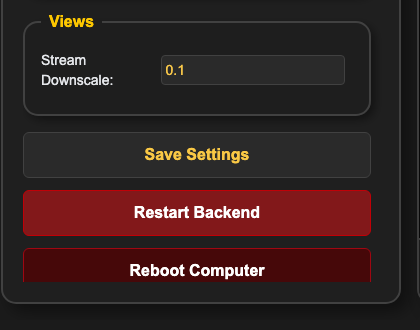
If nothing happens, restart from a shell:
sudo systemctl restart eagleeye
If the button consistently fails but the shell command works, the service account is not allowed to restart the service without a password — an install-level configuration issue.
Accelerators not detected
The startup log lists detected inference devices. If yours is missing:
- GPU — confirm the driver and CUDA stack work outside EagleEye (
nvidia-smi). - MX3 — confirm the device is visible to the OS and the vendor SDK is installed.
Device IDs are lowercase and colon-indexed: cpu, cuda:0, mx3:0. Read the startup log line
listing detected devices rather than assuming an ID — a mistyped device ID raises
unknown device ID: ....
CPU is always available; operations configured for a missing device will not start.
Still stuck
Collect this before asking for help:
- Settings → Download Logs.
- Screenshots of the System tab and the Pipeline tab.
- Your pipeline's node settings, especially bus IDs and
apriltag_map_path. - What changed since it last worked.
Verified against EagleEye-Vision-System main at commit c73a871 (2026-08-20). Quoted error
strings above appear verbatim in the source at that commit.